By cloudrestaurantmanager January 5, 2026
Running a modern restaurant is no longer just about great food and friendly service. It’s about how fast you can take orders, how accurately you can fire tickets to the kitchen, how cleanly you can reconcile the day, and how confidently you can forecast labor and inventory for tomorrow.
That’s exactly why a cloud restaurant management platform has become the operating system for many restaurants—connecting point of sale, online ordering, kitchen workflows, inventory, labor, reporting, and guest marketing in one place.
A strong cloud restaurant management platform helps you standardize operations across shifts and locations, reduce errors, and make decisions using real-time data.
In practical terms, it means fewer missed modifiers, fewer computed meals caused by delays, fewer stockouts on your best sellers, and better control of labor in peak and off-peak hours.
This guide compares cloud restaurant management platforms the way operators actually buy: by restaurant type, workflows, integrations, true costs, and where the category is heading next.
You’ll also get a future-focused view of automation, AI ordering, and security expectations that will shape what “best” means in the next few years.
What a Cloud Restaurant Management Platform Really Is (and What It Isn’t)
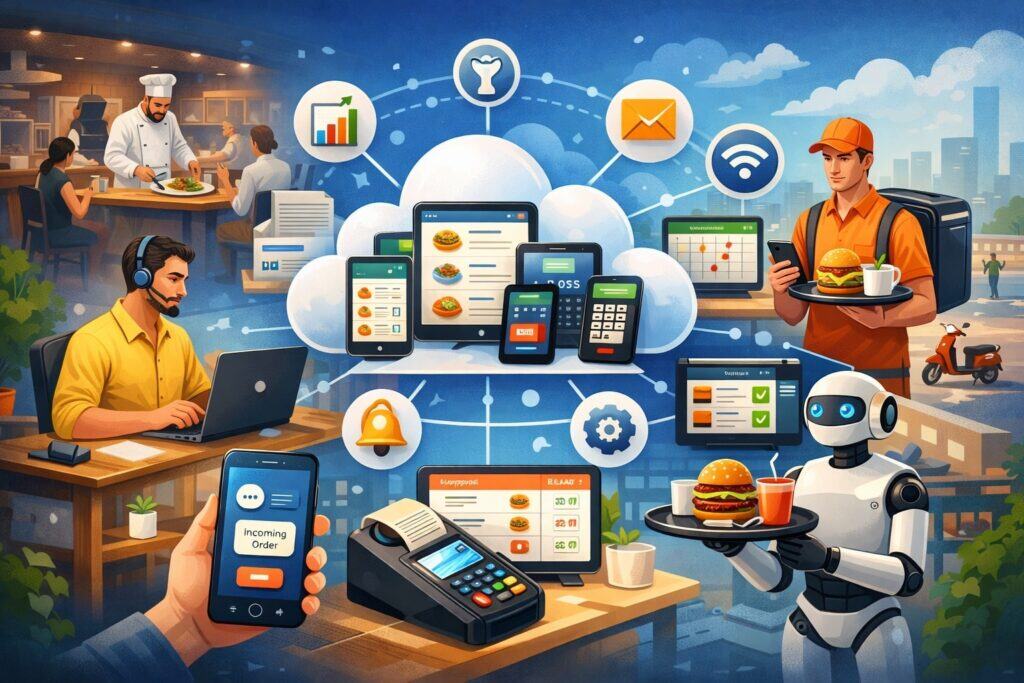
A cloud restaurant management platform is more than a POS with a login. It’s a connected system designed to run the day-to-day operations of a restaurant using cloud software, usually paired with purpose-built hardware like terminals, handhelds, and kitchen display screens.
Most platforms include a POS foundation plus optional modules for online ordering, loyalty, gift cards, marketing, inventory, payroll, scheduling, and analytics.
Toast, for example, describes its restaurant POS as software for operations and sales (POS, online ordering, marketing, inventory/food cost, reservations/table management, reporting) plus employee management (payroll and scheduling) centralized in the same ecosystem.
What it is not: a single tool that automatically fixes operational problems. If your menu data is messy, prep processes are inconsistent, or inventory isn’t counted, even the best cloud restaurant management platform won’t magically produce clean results.
The platform amplifies discipline. It rewards consistent recipes, structured modifier trees, role-based permissions, and scheduled routines like daily cash-out audits and weekly inventory.
When comparing cloud restaurant management platforms, focus on how well the system matches your real service model: quick service vs full service, bar tabs vs counter service, delivery-heavy vs dine-in focused, single location vs multi-location. The “best” platform is the one that fits your operational DNA, not the one with the longest feature list.
Off-Premise, Omnichannel, and Why the Platform Must Unify Orders
Off-premise isn’t an add-on anymore. It’s a core channel that shapes how menus are built, how kitchens are staffed, and how guests expect to buy.
Industry reporting tied to the National Restaurant Association’s 2025 outlook highlights how takeout and drive-thru have become deeply embedded in dining habits, with speed, value, and tech-enabled convenience driving demand.
That shift is why a cloud restaurant management platform must handle omnichannel ordering without creating chaos in the kitchen.
If online orders live in one system, in-store tickets live in another, and third-party delivery tablets sit on the expo counter, you don’t have a platform—you have a patchwork. Patchworks cause missed tickets, delayed fires, inconsistent item availability, and refund-heavy nights.
The strongest cloud restaurant management platforms unify channels so menu updates sync everywhere, item 86’ing works across all ordering sources, and ticket routing keeps production organized.
Square highlights cloud-based value as the ability to manage operations from anywhere and connect tools like KDS and handheld devices to reduce wait times. That matters because off-premise peaks can hit when you’re not physically on-site, yet you still need control.
When you evaluate platforms, test how they handle timing throttles, pickup quotes, delivery prep timing, and menu availability by channel. A platform that treats off-premise as first-class will protect your kitchen from overload and protect your guest experience from broken promises.
AI Ordering, Automation, and the New Competition Among Platforms
The next wave of cloud restaurant management platform competition is not just better reporting—it’s automation that reduces labor pressure while improving service. AI phone ordering, kiosk enhancements, predictive staffing, and automated guest messaging are moving from experiments to mainstream features.
Square has rolled out AI-powered voice ordering that can take calls, capture orders, and place them into the restaurant workflow, with call summaries available for review inside its messaging tools.
This is a big deal operationally because phones are expensive: they interrupt staff during rushes, create misheard orders, and often lead to inconsistent upsells. A cloud restaurant management platform that turns phone orders into structured tickets can reclaim labor and reduce errors.
At the industry event level, coverage of the National Restaurant Association Show has highlighted emerging AI solutions designed to layer voice and automation on top of kiosks, drive-thru systems, and POS workflows.
That signals a broader direction: the platform is becoming the orchestrator of automation, not just the recorder of transactions.
To compare platforms with a future mindset, ask: What automations exist today (voice, kiosk, self-order, smart routing)? What’s on the public roadmap? And how does the platform ensure automation doesn’t create new failure points, like incorrect modifiers or poor handling of allergies?
Cloud Architecture Choices: Cloud-Only vs Hybrid vs Offline-First
Not every restaurant experiences the cloud the same way. Some have rock-solid connectivity. Others deal with busy networks, thick walls, or unreliable internet in older buildings. That’s why architecture matters when choosing a cloud restaurant management platform.
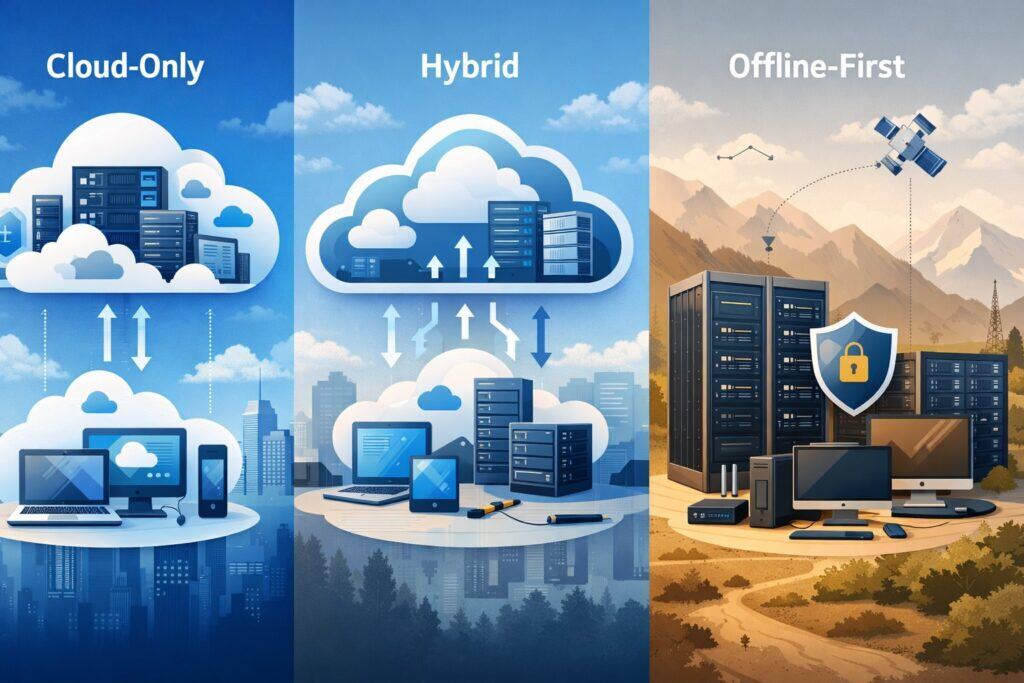
Cloud-only platforms typically rely on continuous connectivity for full functionality. They often excel in centralized updates, multi-location reporting, and remote management.
Square’s restaurant POS marketing emphasizes the benefit of cloud-based systems for monitoring and managing operations from anywhere with an internet connection. That remote control is powerful, especially for owners who want visibility without being on-site.
Hybrid or offline-first platforms keep core functionality running locally and sync back to the cloud when connectivity returns. This can reduce stress during outages, because the dining room doesn’t stop just because Wi-Fi hiccups.
Your evaluation should include practical outage scenarios: Can you keep taking orders? Can you keep printing or displaying kitchen tickets? Can you batch payments? Can you reconcile later?
A cloud restaurant management platform should match your risk tolerance. If your concept cannot afford downtime—high-volume lunch rush, airport kiosk, stadium concessions—then offline behavior and local resiliency become top-tier decision criteria, not footnotes.
Offline Mode and “Hybrid POS” Reality Checks
Offline claims vary widely. Some systems allow order entry but limit payments. Others allow payments but restrict tip adjustments. Others sync with gaps. You need specifics.
TouchBistro is often described as a hybrid system with offline operation, stating that core POS functionality can continue without internet and sync when connectivity returns. If your restaurant experiences occasional outages, that kind of offline continuity can be the difference between a manageable shift and a disaster.
Your cloud restaurant management platform offline test should include these drills:
- Fire a full-service table: appetizers, entrées, split checks, modifiers, voids.
- Run bar tabs and tip adjustments.
- Print or display tickets to the kitchen.
- Close the check and capture payment (or store it safely for later).
- Reconnect and confirm clean sync without duplicate tickets or missing payments.
Do not accept generic “works offline” language. Insist on documentation and real demos, because “offline” is one of the easiest features to oversell and one of the most painful to misunderstand.
Security, Privacy, and PCI Expectations in 2026 and Beyond
Payments make restaurants a target. A cloud restaurant management platform is part of your security perimeter, especially when it handles card data flows, staff permissions, and third-party integrations.
PCI DSS 4.0 introduced updated security expectations and timelines that have pushed merchants and vendors toward stronger access controls, authentication practices, monitoring, and third-party oversight.
Even if your platform claims to handle compliance, you still own parts of the security story: staff passwords, device security, network configuration, and vendor access.
When comparing cloud restaurant management platforms, evaluate:
- Role-based access: can you restrict voids, discounts, refunds, comping, and report access?
- Audit logs: can you see who changed prices, who deleted checks, who reopened a closed ticket?
- Device management: how are terminals locked down? What happens if a handheld is lost?
- Vendor risk: what integrations pull data? Are they reputable? Do they require broad permissions?
The best platform will make “secure by default” easy: least-privilege access, simple device lockdown, clean audit trails, and clear guidance for operators. Security is not a single checkbox—it’s a daily posture supported (or undermined) by your chosen cloud restaurant management platform.
Feature Checklist: What to Compare Across Platforms
A cloud restaurant management platform comparison becomes easier when you organize features into operational layers. Don’t start with branding. Start with workflows: ordering, firing, paying, staffing, stocking, and repeating.
Most platforms now compete in these core areas:
- POS and menu management (including modifiers, combos, coursing)
- Kitchen workflow (KDS, expo, routing rules)
- Payments and tip handling
- Online ordering and delivery management
- Inventory and food cost tools
- Labor scheduling, time clocks, tip pooling, payroll links
- Guest marketing (loyalty, email/SMS, gift cards)
- Reporting and analytics
- Integrations (accounting, workforce, reservations, delivery, CRM)
Toast, for example, positions itself around restaurant-specific operations plus employee tools like payroll and scheduling inside the platform. TouchBistro similarly markets an all-in-one restaurant management system spanning front-of-house, back-of-house, and guest engagement.
To pick correctly, you should decide which modules must be native (built-in) and which modules you’re comfortable sourcing via integrations. Native modules can be smoother and more consistent. Integrations can be more flexible and best-in-class, but they increase vendor complexity and require careful data mapping.
POS + KDS + Handhelds + Kiosks: The Modern Throughput Stack
In 2026, speed and accuracy are your margin. The strongest cloud restaurant management platform will reduce friction from order capture to kitchen execution to payment completion.
Handhelds have become a serious lever for table turns and guest satisfaction. Square launched a dedicated handheld POS device designed to take payments and orders on the move, emphasizing portability and all-day use.
Whether you choose Square, Toast, Clover, or another ecosystem, handheld strategy matters because it changes labor patterns: fewer trips to terminals, fewer bottlenecks at the host stand, and faster check closure.
Kitchen display systems (KDS) are equally critical because printers alone can’t provide real-time pacing. A good KDS setup supports routing (grill vs sauté vs pantry), coursing, expo views, ticket timers, and bump controls. Square highlights KDS as part of its restaurant stack, supporting a more connected kitchen workflow.
Kiosks and self-order stations also continue to grow as restaurants chase higher average ticket sizes and reduced ordering labor. When your cloud restaurant management platform supports kiosks cleanly, you can keep menus consistent, capture modifiers accurately, and avoid kiosk orders becoming “second-class” tickets.
Compare platforms by running a throughput simulation: 50 tickets in 30 minutes, heavy modifiers, a rush of online orders, and a staff member calling out. The platform that stays calm under stress is the right cloud restaurant management platform for growth.
Inventory and Food Cost Control: From Counts to Forecasting
Inventory is where profit quietly leaks. A serious cloud restaurant management platform should help you control food cost, reduce waste, and forecast purchasing without drowning you in spreadsheets.
Toast is frequently positioned as offering integrated inventory and food cost tooling alongside POS and reporting. In many operations, “integrated” matters because sales data and recipe usage should align.
If your POS sells 40 burgers, your inventory system should reflect theoretical usage of patties, buns, and toppings—then highlight variance vs actual counts.
For restaurants that need deeper back-office control, Restaurant365 positions its inventory management as end-to-end visibility into items flowing through the business, and it also frames its platform as connecting accounting, inventory, scheduling, payroll, and HR with integrations and APIs.
That’s important for multi-unit operators who want standardized recipes, vendor catalogs, commissary workflows, and consistent cost reporting across locations.
When comparing cloud restaurant management platforms, ask how inventory works in real life:
- Can you do partial counts quickly on a phone?
- Are vendor invoices easy to enter and reconcile?
- Can you map recipes and track theoretical vs actual?
- Does the system support multi-location transfers and commissary production?
- Can you forecast ordering based on sales trends and upcoming events?
Inventory isn’t just “track stock.” In the best cloud restaurant management platform, it becomes an operational radar that detects waste patterns early.
Workforce Tools: Scheduling, Tips, Payroll, and Labor Cost Discipline
Labor is one of your biggest controllable costs, but it’s also the most emotionally sensitive lever in a restaurant. That’s why workforce features and integrations matter so much in a cloud restaurant management platform.
Toast explicitly includes employee management software such as payroll and scheduling centralized with POS operations. That kind of tight coupling can reduce admin time, because time clock data, tip data, and sales data live close together.
Many restaurants also use specialized labor platforms. Toast’s integration page for 7shifts describes 7shifts as a mobile, cloud-based scheduling and labor management tool trusted by large numbers of restaurant professionals, emphasizing labor cost control and communication through integration.
Lightspeed also supports 7shifts integration and notes that sales and labor data can feed scheduling AI that tailors schedules to demand patterns.
When choosing your cloud restaurant management platform, look for:
- Time clock rules that match your reality (breaks, overtime alerts, role switching).
- Tip pooling and tip reporting that supports your service model.
- Permission controls (discounts, voids, comps) by role.
- Labor reporting that ties staffing levels to sales by hour.
The best platform won’t just “show labor %.” It will help you improve it without burning out your team—through better forecasting, cleaner communication, and less admin drag.
Comparing Platforms by Restaurant Type and Growth Stage
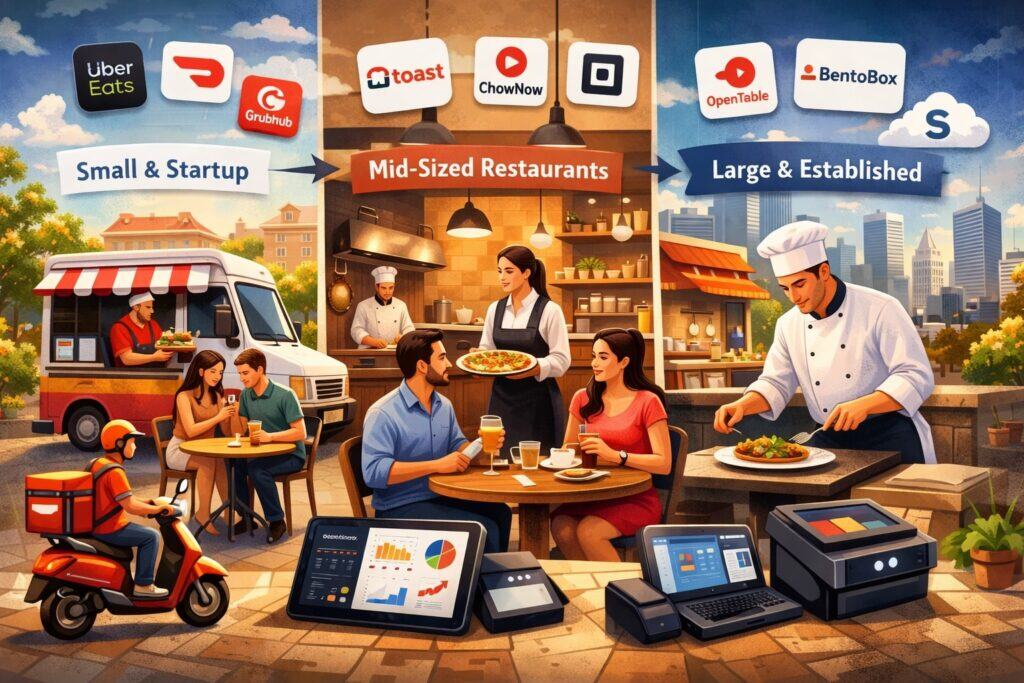
A cloud restaurant management platform should fit your concept today and still fit when you add revenue channels or locations. That’s why a useful comparison is not “Platform A vs Platform B” in the abstract. It’s “Platform A for this restaurant model.”
Below are practical “best-fit” patterns based on commonly stated strengths and positioning from vendors and reputable reviewers:
- Square for Restaurants: often positioned as accessible and scalable for a wide range of restaurant types, with strong tooling around KDS, handhelds, and a broader ecosystem.
- Toast: frequently positioned as restaurant-specific, with a unified stack that can include online ordering, inventory/food cost, and payroll/scheduling.
- TouchBistro: commonly positioned for restaurant workflows with FOH/BOH and guest engagement tooling, and frequently discussed in relation to hybrid/offline operation.
- NCR Aloha Cloud: positioned as a restaurant POS from a legacy restaurant technology lineage, with cloud-based management and scalability.
- SpotOn: positioned as a restaurant management and payments provider with strong customer satisfaction signaling in G2 reports (as claimed by SpotOn) and an emphasis on helping operators manage economic pressure.
- Clover: positioned as a flexible hardware + app ecosystem that can be configured for restaurant needs, with mainstream business media noting restaurant suitability and staff management tools.
- Revel: positioned as a more premium, feature-heavy option with multi-location capabilities and add-ons like kiosks, inventory, loyalty, and delivery tools (with higher costs).
Your job is to map these patterns to your workflow, not to chase brand popularity.
Quick Service, Cafes, and Counter-Service Concepts
Quick-service restaurants win when ordering is fast, menus are clean, and throughput stays high during spikes. For this model, a cloud restaurant management platform must handle modifiers efficiently, support fast payments, and reduce friction in the kitchen.
Square’s restaurant POS emphasizes cloud-based management and tools like handhelds and KDS to fulfill orders and reduce wait times. NerdWallet’s review framing often describes Square for Restaurants as affordable and scalable with integrations like KDS and loyalty, with increasingly stronger support for broader restaurant needs.
In counter-service, look for:
- Fast item search and modifier flows
- Split tender and tip prompts that don’t slow lines
- KDS routing for prep stations
- Online ordering that doesn’t create separate production chaos
- Digital receipts and customer profiles for loyalty growth
If you’re running a café, bakery, or fast casual operation, your cloud restaurant management platform should prioritize speed and simplicity. The more “enterprise” complexity you add, the more you risk slowing down staff and increasing training time.
Full Service, Bars, and Table-Service Workflows
Full service adds complexity: coursing, table maps, seat numbers, bar tabs, split checks, and tip adjustments. A table-service-friendly cloud restaurant management platform must handle these smoothly, or your floor will suffer.
Toast positions its software around restaurant operations including table management and reporting, plus employee tools centralized in the system. TouchBistro emphasizes FOH/BOH and guest engagement in a unified restaurant platform, and it’s often discussed for iPad-based table-service setups.
In bars, the real test is tab control and speed. You want:
- Fast tab creation and name recall
- Easy comping controls with manager permissions
- Tip adjustments and closeout workflows that match your team
- Reporting that separates bar vs dining performance clearly
A cloud restaurant management platform that is “fine” for quick service can feel painful in full service if table workflows are clunky. Always demo the hardest parts of your service model—split checks, coursing, and bar tabs—before you commit.
Multi-Location and Enterprise Operations
Multi-location restaurants care about centralized control, consistent menu rollouts, unified reporting, and scalable support. For them, a cloud restaurant management platform should reduce variation across stores while still allowing local flexibility where needed.
Aloha Cloud is positioned by NCR Voyix as cloud-based restaurant software designed to simplify operations end-to-end with seamless POS integration. G2’s Aloha Cloud profile describes capabilities that go beyond POS, including fixed/handheld POS, online ordering, loyalty, email marketing, reporting, and payment processing.
Revel is often described as a robust, feature-rich system used by many businesses, with offerings like kiosks, inventory management, loyalty, and delivery tools—though reviewers frequently note higher costs and implementation fees. SpotOn also signals strong customer satisfaction positioning via its own reporting of G2 rankings.
For multi-location, compare:
- Menu publishing controls and approval flows
- Location-level permissions and reporting filters
- Centralized inventory catalogs and recipe standards
- Integration support for accounting and workforce tools
- SLA-like support responsiveness and onboarding quality
In enterprise, the cloud restaurant management platform is less about “cool features” and more about dependable governance.
True Cost Comparison: Subscriptions, Hardware, Processing, and Hidden Fees
Most buying mistakes happen because restaurants compare sticker prices instead of true costs. A cloud restaurant management platform can look “cheap” monthly but become expensive through processing requirements, add-on modules, hardware leases, installation fees, and contract terms.
Reviewers commonly point out that restaurant platforms vary widely in whether they require a specific payment processor or allow third-party processing. For example, some Toast reviews state that Toast Payments is required and contracts can be multi-year, while also describing starter pricing structures and hardware bundle costs.
Revel reviews often cite a higher starting monthly price per terminal and professional installation fees. Clover is frequently discussed as flexible but with pricing that can vary by reseller or configuration, and mainstream business media highlights restaurant suitability and employee tools like scheduling/time tracking.
When you compare cloud restaurant management platforms, build a 12–24 month view that includes:
- Software subscription + required add-ons (online ordering, loyalty, payroll, etc.)
- Hardware (terminals, printers, KDS screens, handhelds, cash drawers)
- Installation and onboarding fees
- Payment processing rates and effective blended costs
- Support plans (especially 24/7 support)
- Integration fees (some integrations require paid connectors)
The goal is not to find the lowest monthly price. The goal is to find the cloud restaurant management platform that produces the lowest operational friction per dollar spent.
Contracts, Data Access, and Switching Costs
Restaurants rarely plan to switch platforms, but many end up switching after growth, ownership changes, or operational pivots. That’s why you must evaluate switching costs before you sign.
Ask every cloud restaurant management platform vendor:
- Can you export raw sales data, labor data, and item-level details anytime?
- Can you export guest lists and loyalty data in a usable format?
- How do you migrate menus, modifiers, and recipes out if needed?
- What happens to gift card balances if you leave?
- What are contract lengths and early termination terms?
Even if you never switch, negotiating with clarity improves your position. Vendors treat sophisticated buyers differently, and your restaurant deserves that leverage.
Implementation Roadmap: How to Roll Out Without Breaking Service
A cloud restaurant management platform rollout is not an IT project—it’s a service continuity project. Your mission is to upgrade systems while protecting guests and staff from disruption.
Start with workflow mapping. Document how orders flow today: who rings, who fires, who expediters, where tickets bottleneck, how voids and comps are approved, how tips are handled, and how end-of-day closeout works. Then build your platform configuration around that reality.
Next, build clean data:
- Menu structure with accurate names, pricing, and tax rules
- Modifier trees that reflect how guests order (and how the kitchen cooks)
- Printer/KDS routing rules that match stations
- Employee roles and permissions that prevent abuse
TouchBistro highlights integrations across accounting, inventory, online ordering, payroll, and scheduling, which matters because implementation often depends on what you’re connecting on day one vs later.
Restaurant365 emphasizes integrations and open APIs for connecting to POS providers, vendors, and banks—useful if your rollout includes back-office modernization. A calm, phased rollout often beats a “big bang” launch, especially for busy dining rooms.
Training, Change Management, and Your First 30 Days of KPIs
Training is where platforms win or lose. A cloud restaurant management platform can be powerful, but if staff can’t execute the basics in a rush, your guest experience takes the hit.
Train in layers:
- Servers and cashiers: order entry, modifiers, splitting checks, closing payments
- Kitchen: KDS usage, bump rules, routing expectations
- Managers: void controls, comps, refunds, closeout reports, deposits
- Owners/GMs: dashboards, labor reports, prime cost indicators, multi-location summaries
Your first 30 days should track a simple KPI set tied to operational outcomes:
- Ticket time (by channel)
- Order error rate / comps due to mistakes
- Labor % by daypart
- Food cost variance (theoretical vs actual, if supported)
- Online order completion rate and refund rate
A cloud restaurant management platform should help you improve these numbers, but only if you actively use them. Think of the first month as calibration: tighten modifier trees, fix routing issues, adjust tip workflows, and refine permissions.
Future Predictions: Where Cloud Restaurant Management Platforms Are Going
The category is moving fast. The next generation of cloud restaurant management platforms will look less like “POS software” and more like “restaurant automation and intelligence.”
The National Restaurant Association’s research hub points to ongoing work on workforce technology and broader trend forecasting for the year ahead, signaling that labor and technology adoption will remain central themes.
Meanwhile, platform vendors are competing to offer more end-to-end tooling so operators don’t need a dozen separate subscriptions.
Here’s what’s likely to accelerate through 2026–2028:
- AI-assisted ordering (phone, drive-thru, kiosks) becomes normal for high-volume concepts.
- Predictive labor scheduling becomes more widespread as platforms connect sales + labor + local signals.
- Inventory forecasting improves as recipe mapping and purchase data become cleaner.
- Payment experiences continue shifting toward contactless, mobile wallets, and faster checkout flows.
Choosing a cloud restaurant management platform now means choosing a direction. The best buyers select platforms that can evolve, not just platforms that fit today.
Predictive Labor, Local Signals, and Smarter Scheduling
Labor optimization is moving from reactive (“cut someone early”) to predictive (“schedule accurately upfront”). Square has described AI upgrades that incorporate local signals like events and weather into insights, helping businesses adapt staffing and inventory decisions.
Lightspeed’s integration guidance around 7shifts describes how sales and labor data can power scheduling AI tuned to demand.
In the near future, your cloud restaurant management platform will increasingly suggest:
- Staffing levels by hour based on expected demand
- Prep lists based on forecasted item mix
- Suggested menu pushes based on margin and inventory levels
- Alerts when labor or food cost variance spikes
This won’t replace good management, but it will reduce guesswork. The restaurants that win will be the ones that treat the platform as a decision engine, not just a register.
Payments Evolution: Contactless Momentum and Optional Alternative Tender
Payment trends are also shaping the cloud restaurant management platform roadmap. Contactless and handheld payments keep expanding because they reduce wait time and increase table turns. Square’s handheld device launch is one example of how hardware is evolving to match mobile workflows.
On the frontier, some platforms are experimenting with alternative tender support. TechCrunch reported that Square launched new features including AI voice ordering and an integrated Bitcoin option for merchants.
Whether or not your restaurant ever accepts crypto, the bigger point is that platforms are expanding what “payments” means: more tender types, tighter banking features, faster funding options, and more integrated financial tooling.
A future-proof cloud restaurant management platform should let you adopt new payment experiences without tearing apart your workflow or adding fragile bolt-ons.
FAQs
Q.1: What’s the difference between a cloud restaurant management platform and a “restaurant POS”?
Answer: A restaurant POS is usually the transaction engine: it takes orders, processes payments, and produces receipts. A cloud restaurant management platform is broader. It treats POS as the core, then layers operational systems around it—online ordering, kitchen routing, inventory, labor, marketing, analytics, and integrations.
The difference shows up the moment you try to manage the whole business. A POS-only setup might ring sales perfectly, but it may not help you forecast staffing, reconcile invoices, analyze menu profitability, or unify guest profiles across dine-in and online ordering.
A platform approach attempts to centralize those capabilities. Toast, for instance, describes a unified stack that spans operations and sales plus payroll and scheduling inside the same system.
If you run a simple concept with limited menu complexity, you can succeed with a lighter POS. But if you are serious about growth, multi-channel ordering, and cost control, a cloud restaurant management platform is usually the better long-term foundation.
Q.2: Do cloud restaurant management platforms work if the internet goes down?
Answer: It depends on the platform architecture. Some are cloud-first and may limit functionality during outages. Others are hybrid/offline-first and keep core operations running locally, syncing once connectivity returns.
TouchBistro is often described as a hybrid system with offline functionality that continues to operate and then syncs when the connection is restored. That model can be a safer fit for restaurants with unreliable connectivity.
When comparing a cloud restaurant management platform, don’t accept vague claims. Test outage behavior with your real workflows: table service, bar tabs, split checks, payments, KDS routing, and end-of-day closeout. Your restaurant doesn’t get to pause service—so your platform shouldn’t either.
Q.3: How do I choose between an all-in-one platform and a “best-of-breed” stack?
Answer: An all-in-one cloud restaurant management platform reduces vendor sprawl. Fewer logins, fewer disconnected dashboards, fewer “whose fault is it?” support loops. It can be smoother for training and daily operations.
A best-of-breed approach uses a POS as the center, then adds specialized tools for labor, inventory, reservations, loyalty, or accounting. This can be ideal when you want deeper capability in one area, such as advanced labor scheduling through 7shifts or back-office control through Restaurant365.
The decision comes down to complexity tolerance. If your team can manage integrations and you have someone who “owns the stack,” best-of-breed can win. If your restaurant needs simplicity and speed, an all-in-one cloud restaurant management platform often produces better adoption and fewer operational cracks.
Q.4: What should I prioritize first: online ordering, labor tools, or inventory?
Answer: Prioritize based on what is actively hurting margins today.
- If you are refunding online orders, missing tickets, or drowning in delivery chaos, start with omnichannel ordering that unifies tickets and controls throttles.
- If labor is your biggest pain and schedules are constantly wrong, start with time clocks, role-based scheduling, and labor reporting.
- If food cost variance is high and waste is persistent, start with inventory routines, recipe mapping, and purchase workflows.
Most restaurants eventually need all three. The best strategy is to pick a cloud restaurant management platform that handles your top priority strongly today and supports clean expansion later. Platforms that integrate workforce and inventory tools can help you phase adoption without rebuilding the whole system.
Q.5: What are the biggest “gotchas” when switching cloud restaurant management platforms?
Answer: The biggest gotchas are rarely technical. They’re operational and contractual.
First, the menu rebuilds complexity. If your modifiers, combos, and coursing rules are messy, migration takes longer than expected. Second, staff retraining.
A new cloud restaurant management platform changes muscle memory at terminals, and that can impact guest experience for a few weeks. Third, data continuity. Guest lists, gift card balances, and historical reporting may not migrate cleanly, depending on vendor policies and export options.
Finally, contract and processing constraints can surprise buyers. Some platforms strongly prefer or require their payment processing, and some have multi-year agreements. Reviews commonly flag these as areas to understand early.
A smart switch plan includes parallel testing, phased deployment, clean export expectations, and a training plan tied to shift performance—not just “watch this video.”
Conclusion
There is no universal winner in cloud restaurant management platforms—only best fits. Square can be a strong fit for many concepts that want approachable setup and an expanding ecosystem, including modern tools like KDS, handheld workflows, and AI voice ordering.
Toast often appeals to operators who want a restaurant-specific, unified stack that ties operations to employee management in one ecosystem. TouchBistro may stand out for restaurants that value iPad-based table service and hybrid/offline resilience.
Aloha Cloud and other enterprise-leaning options can make sense for operators focused on scalability and standardized control.
To choose well, stop thinking like a software shopper and start thinking like an operator. Map your workflow. Stress-test rush scenarios. Validate offline behavior. Confirm integration depth. Build a real 12–24 month cost model.
Then pick the cloud restaurant management platform that improves throughput, reduces errors, tightens labor and food cost discipline, and gives you confidence that the system can evolve with where restaurants are heading—automation, AI ordering, and stronger security expectations.